Home battery – smart charging
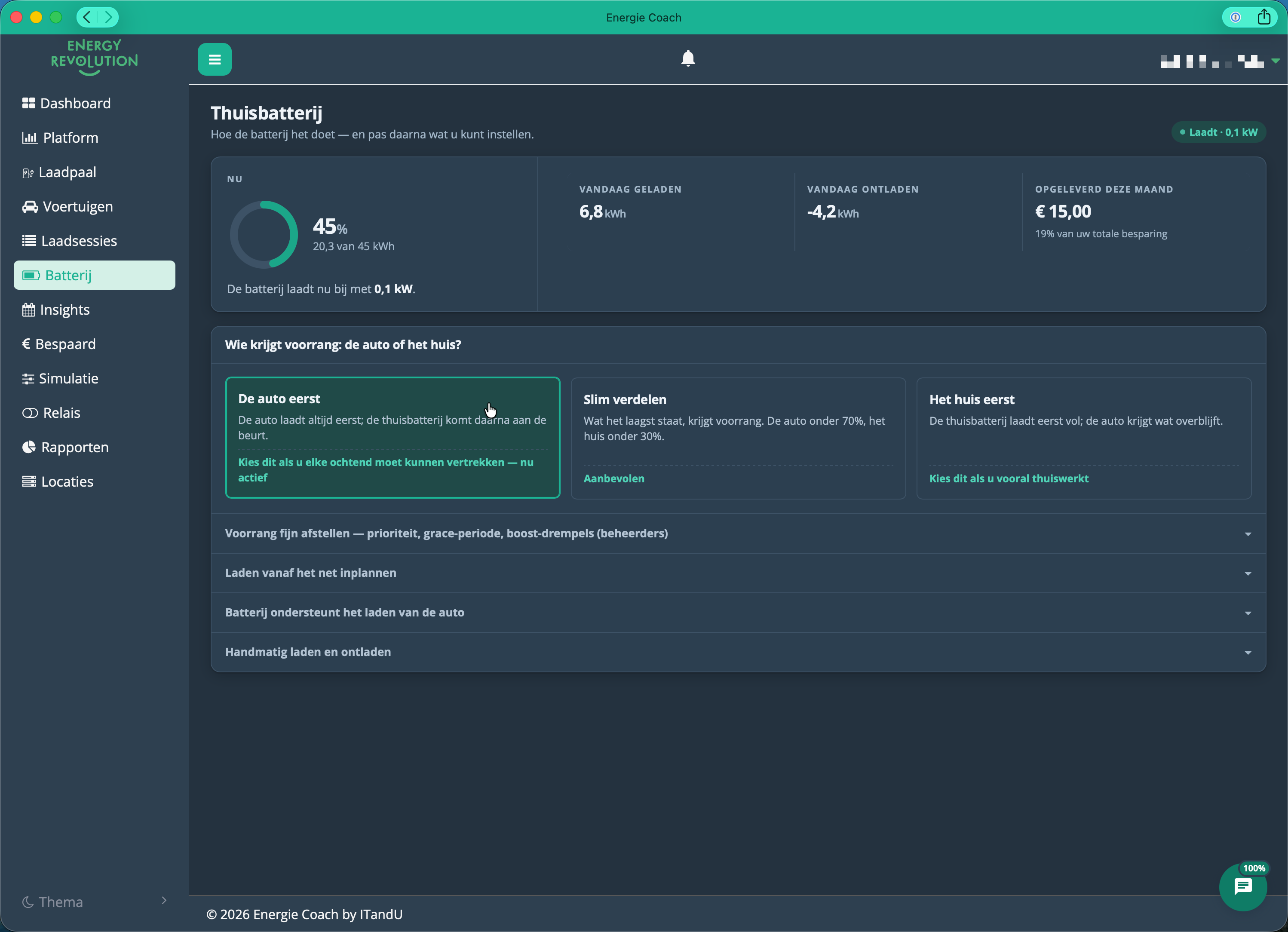
The Thuisbatterij (Home battery) page: how the battery is doing at the top, the priority choice and the collapsible settings below.
Your home battery stores your solar surplus during the day and releases it in the evening, so you buy less from the grid after dark. With a dynamic energy contract, it also charges from the grid during the cheapest hours to cover an expensive evening peak.
This runs fully automatically: the system makes a fresh decision every 5 to 15 minutes.
What the system looks at every time
Full · see Packages
Each decision weighs:
- Electricity prices — today's current and remaining hourly prices, and (after 14:00) tomorrow's prices too.
- Solar forecast — how much solar is expected in the coming hours. Less solar means a higher charge target from the grid; more solar means a lower one. Either way, that target gets filled during the cheapest available hours — there's no separate "cloudy mode."
- Your consumption pattern — learned from the last 15 days, by time of day.
- Current battery level and available charge rate.
The golden rule is simple: charge when it's cheap, use the battery when it's expensive.
Before and after 14:00: the day-ahead cutoff
Full · see Packages
The Belgian day-ahead market (Belpex) publishes tomorrow's prices every day around 14:00. That changes what the system can plan for:
| Time | What the system knows | Strategy |
|---|---|---|
| Before 14:00 | Only today's remaining hourly prices | Optimise for today, keep enough buffer until midnight |
| After 14:00 | Today + tomorrow (48 hours ahead) | Compare both days — is tomorrow cheaper? Then the system waits and charges then instead |
The reserve: always enough until 06:00
The system keeps a minimum reserve, set per installation (typically low, around 10% — not a fixed platform-wide percentage). That reserve covers:
- your overnight consumption, until 06:00 the next morning,
- unexpected consumption spikes.
The honest story about the safety rules
There's a common but inaccurate belief about when the battery "ignores price." In reality, that only happens in one case.
That's not accurate. A low or falling battery does not make the system ignore price. What actually happens: when expensive hours are coming, the system raises its reserve target ahead of time, and fills that higher reserve during the cheapest available hours before the expensive period starts. Price still matters — only the target moves up.
The only situation where the system genuinely charges regardless of price is when reliable price data isn't available (for example, a price feed outage). Without trustworthy prices there's nothing to weigh a "cheap hour" against, so the system defaults to keeping your home powered safely: it charges immediately, until good data returns. This is temporary and stops as soon as price data is restored.
Usually one of two reasons: the system is topping up its reserve ahead of an upcoming expensive period, or — despite the high price — it's the cheapest hour still available today (or tomorrow is even more expensive). Trust the system: it isn't ignoring price for no reason.
Who gets priority: the car or the house?
Light · Full · see Packages
If you also have an electric car, you choose on the battery page who gets priority when available power is allocated ("Wie krijgt voorrang: de auto of het huis?"):
| Choice | What it does |
|---|---|
| De auto eerst ("The car first") | The car always charges first; the home battery comes after. Pick this if you need to be able to leave every morning. |
| Slim verdelen ("Smart split", recommended) | Whatever is lowest gets priority: the car below 70%, the house below 30%. |
| Het huis eerst ("The house first") | The home battery fills up first; the car gets what's left. Pick this if you mostly work from home. |
Administrators can fine-tune this further (priorities, grace period, boost thresholds) via the collapsible "Voorrang fijn afstellen" ("Fine-tune priority") section.
Battery support for charging your car
Light · Full · see Packages
Under "Batterij ondersteunt het laden van de auto" ("Battery supports charging the car") you decide whether the home battery may help charge your car, alongside solar and grid:
- "Thuisbatterij mag de auto helpen laden" ("Home battery may help charge the car", On/Off) — switches the support on or off. A change can take up to 60 seconds to become visible in the portal.
- "Maximaal ontlaadvermogen voor de auto" ("Maximum discharge power for the car", 1–10 kW) — caps how much power the battery may deliver to the car.
- "EV-laadplanning" ("EV charging planning") — how much energy the battery planning sets aside for the car each day: Uit (off), Automatisch (the system learns it from your charging history) or Handmatig (a fixed daily reserve in kWh).
See EV charging for the full picture of how the car and the home battery work together.
Scheduling a charge from the grid
Light · Full · see Packages
Under "Laden vanaf het net inplannen" ("Schedule charging from the grid") you can have the battery top up from the grid once, at a moment you choose — handy before a day with little sun or high prices. Pick a start and end time and click "Activeer gepland laden" ("Activate scheduled charging"); "Wis planning" ("Clear schedule") removes it again.
Manual charging and discharging
Light · Full · see Packages
Under "Handmatig laden en ontladen" ("Manual charging and discharging") you set a fixed charge or discharge power yourself, with a slider up to your installation's maximum. Confirm with "Activeer aangepast laden" ("Activate custom charging") or "Activeer aangepast ontladen" ("Activate custom discharging").
For as long as manual charging or discharging is active, the automatic control is set aside and your savings drop. A banner appears at the top of the page — "Batterij staat op handmatig" ("Battery is on manual") — click "Hervat automatische regeling" ("Resume automatic control") to let the system decide again.
If you set a power above 3 kW, you're outside the supported range: your inverter and battery determine the actual maximum themselves, and the power you set may not be reached. The portal asks for a one-time confirmation, which is recorded.
Do you have a capacity tariff? Manual charging at high power can raise your monthly peak — and therefore your grid tariff. Manual charging does not take your capacity limit into account.
The value you set applies per battery/inverter combination.
Seasonal behaviour
- Summer — lots of surplus: the battery tops up daily and covers most evenings on solar alone.
- Winter — little surplus: the battery does less on solar alone, but with a dynamic contract it still helps by shifting your usage to the cheapest hours.
First check whether the battery is simply full (nothing more to store) or sitting at its reserve (nothing left to give) — that's normal behaviour, not a fault. If the top of the page says "Batterij staat op handmatig" ("Battery is on manual"), click "Hervat automatische regeling" ("Resume automatic control"). Still unclear? Contact your installer with your battery level and the time you noticed it.