EV charging
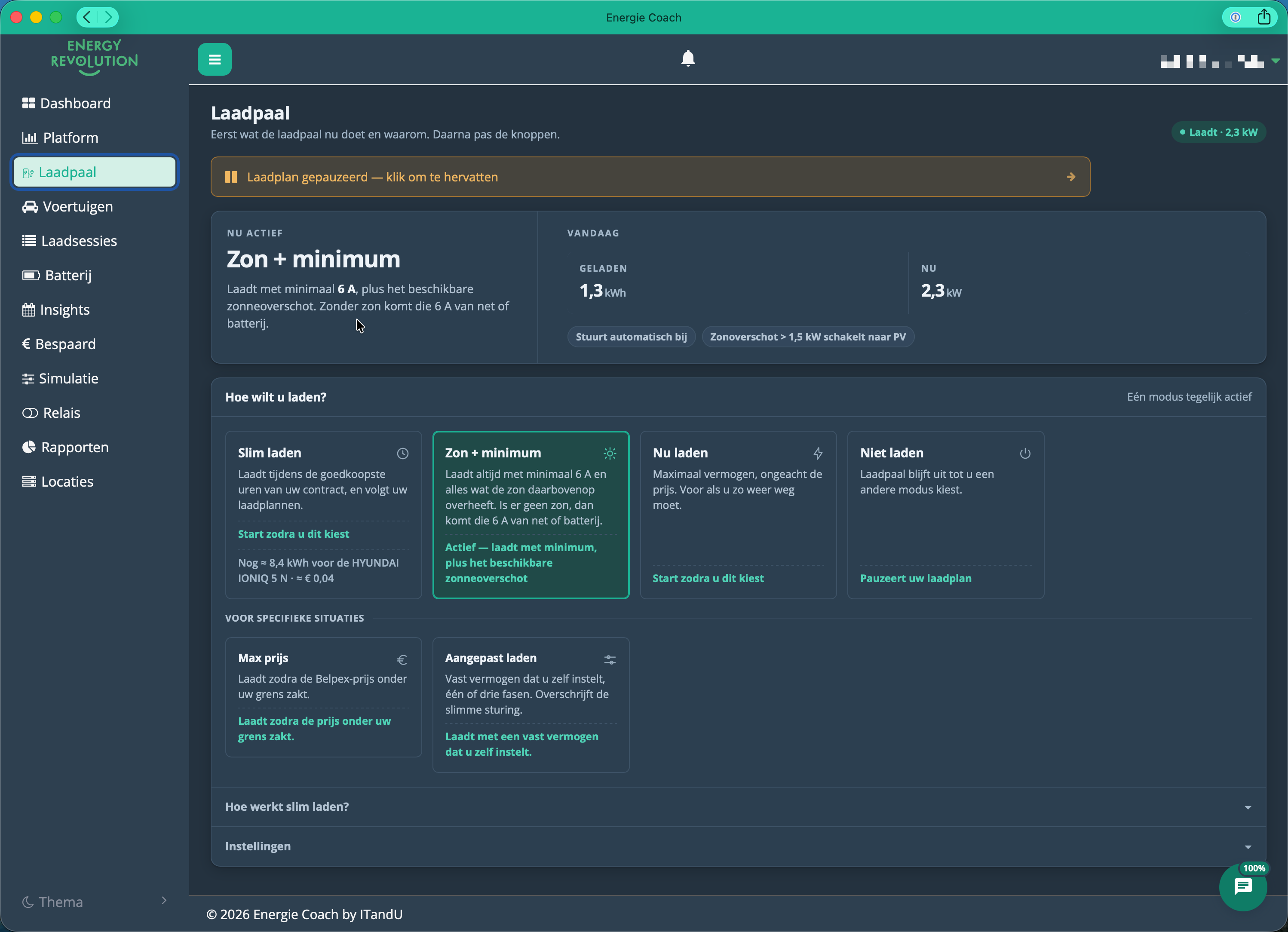
The Laadpaal (Charger) page: what the charger is doing now and why at the top, the charging modes below.
Your system can smart-charge your electric car using solar, your home battery, and the grid. There's no factory default: your car won't charge until you actively choose a charging mode.
For most users, Slim laden ("Smart charging") combined with a charging plan is the best choice: set a target and a time once, and the system handles the rest.
The Laadpaal (Charger) page
The page first shows what the charger is doing right now and why (the "Nu actief" / "Now active" block), together with what has been charged today. Below that, you pick a charging mode under "Hoe wilt u laden?" ("How do you want to charge?") — there is always exactly one mode active at a time.
| Mode | When to use | What it does |
|---|---|---|
| Slim laden ("Smart charging") (Full) | Daily use | Charges during the cheapest hours of your energy contract, and follows your charging plans |
| Zon + minimum ("Solar + minimum") | Prefer steering yourself over setting a plan | Always charges at a minimum of 6 A (≈ 1.4 kW on 1 phase, ≈ 4.1 kW on 3 phases), plus whatever solar surplus is available on top; without sun, that 6 A comes from grid or battery |
| Nu laden ("Charge now") (Light · Full) | You need to leave soon | Maximum power, regardless of price |
| Niet laden ("Don't charge") (Light · Full) | The car doesn't need charging | The charger stays off until you pick another mode; a running charging plan is paused |
Behind "Voor specifieke situaties" ("For specific situations") there are two more modes. For both, you set the value first and confirm with "Toepassen" ("Apply"):
| Mode | When to use | What it does |
|---|---|---|
| Max prijs ("Max price") (Full) | Charging under a price cap you choose | Charges whenever the Belpex price drops below your limit (€/MWh) |
| Aangepast laden ("Custom charging") (Light · Full) | Predictable, fixed charging power | You pick a fixed current (6–32 A) and 1 or 3 phases; the portal shows the resulting power in kW right next to it; overrides the smart control |
Slim laden and Max prijs only work with a Day and night or Dynamic energy plan (see Energy contract & dynamic tariffs).
Power ≈ current × 230 V per phase. So 6 A is roughly 1.4 kW on 1 phase and 4.1 kW on 3 phases, and 16 A on 3 phases is roughly 11 kW. In Aangepast laden the portal converts this live as you move the slider.
If you switch modes while a charging plan is active, the portal asks for confirmation first — so you don't accidentally stop tomorrow morning's plan.
Niet laden stops charging completely: no solar, battery, or grid power reaches the car, even if a charging plan is scheduled or actively running. Nothing resumes automatically — a banner appears at the top of the page, "Laadplan gepauzeerd — klik om te hervatten" ("Charging plan paused — click to resume"), or you pick another mode yourself.
At the top right of the modes panel, the "Hoe werkt slim laden?" ("How does smart charging work?") button unfolds a short explanation of how your energy contract steers charging.
Below the modes there is one collapsible section, "Voorkeuren voor slim laden" ("Smart-charging preferences"). While closed it already shows your current choices (e.g. Goedkoopst · zonnemodus aan · max 5,0 kW); open it to find:
- your default preference for new charging plans (Goedkoopst / "Cheapest" or Groenst / "Greenest", suggested whenever you create a charging plan);
- "Overdag automatisch naar zonnemodus" ("Automatically switch to solar mode during the day"): with more than 1.5 kW of solar surplus, the car then charges from the sun instead of the grid;
- your maximum grid usage (read-only here — change it via Installatie-instellingen openen / "Open installation settings").
Charging plans — how they work
Full + Vehicle link · see Packages
You create a charging plan on the Voertuigen (Vehicles) page, in the Laadplannen (Charging plans) block via "+ Nieuw plan" ("+ New plan"). You set:
- "Klaar om" ("Ready by") — the time the car needs to be ready (quick picks 05:00 / 06:00 / 07:00 / 08:00, or your own time);
- "Doel batterijniveau" ("Target battery level") — for example 80%;
- "Voorkeur" ("Preference") — Goedkoopst (cheapest) or Groenst (greenest);
- optionally "Herhalend" ("Repeating") — every week, on the days you pick, with a different time or target per day if you want.
As you set it up, the form immediately shows the consequence: how many kWh are still needed, how many charging hours that takes, and the estimated cost compared to charging immediately.
The system then automatically schedules charging during the cheapest available hours before your deadline. If solar surplus becomes available along the way, it temporarily switches to solar-following charging to use that free power first, then falls back to the cheap-hours plan once the surplus disappears.
For as long as a plan is scheduled or running, the Laadpaal page shows "Laadplan actief" ("Charging plan active").
For each plan in the list you can:
| Action | What it does |
|---|---|
| Pause / resume (the pause/play icon) | Temporarily switches the plan off or back on, without deleting it |
| "Bewerken" ("Edit") | Change the time, target, or days |
| "Verwijderen" ("Delete") | Remove the plan permanently (with confirmation) |
If two active plans overlap, the list tells you that only the earliest plan runs.
The Voertuigen (Vehicles) page
Full + Vehicle link · see Packages
Under Voertuigen you connect your car via "+ Voertuig koppelen" ("+ Connect vehicle", through your car manufacturer's account). Each connected car gets a card showing:
- the car's battery level, range, and whether it's charging right now;
- the status of its charging plan: ready by when, at what target, and what that is estimated to cost;
- "Laden deze maand" ("Charging this month") — how much was charged over the last 30 days, what share came from your own solar, and what it cost;
- "Wat opviel" ("What stood out") — personal insights, such as your most expensive charging hour or a missed cheap opportunity.
Under the collapsible vehicle details you can check the car's battery capacity and maximum charging power, and adjust them yourself if needed. Each field shows where its value comes from: Smartcar (automatically from your car manufacturer) or Handmatig ("Manual", entered by you). You'll also find the car's battery history for the last 30 days as a chart.
If you disconnect a vehicle, its charging plans stop — your charging sessions are kept.
Battery support and priority
Light · Full · see Packages
Your home battery can optionally help charge your car. You configure this on the Batterij (Battery) page:
- "Thuisbatterij mag de auto helpen laden" ("Home battery may help charge the car", On/Off) — switches the support on or off.
- "Maximaal ontlaadvermogen voor de auto" ("Maximum discharge power for the car", 1–10 kW) — caps how much power the battery may deliver to the car.
- "Wie krijgt voorrang: de auto of het huis?" ("Who gets priority: the car or the house?") — choose De auto eerst (car first), Slim verdelen (smart split, recommended) or Het huis eerst (house first). See Home battery for what each choice means.
During the first minutes after plugging in the car (the "grace period"), the car gets priority regardless, so charging power and phase can ramp up smoothly before normal coordination with the battery kicks in. Your installer can adjust that period.
In Zon + minimum and similar modes, the system automatically switches between 1-phase and 3-phase charging: up around ~4.55 kW, down around ~2.5 kW, with a 10-minute cooldown between switches. This protects the charger from switching back and forth too quickly — you may notice an occasional brief pause during the switch, and that's normal.
More than one car
A single charger charges one car at a time. If you have several vehicles linked, set the active car before plugging in (the "Als actief instellen" / "Set as active" button on the vehicle card): the system warns you if the charging plan is still set for a different vehicle, so you don't accidentally charge to the wrong target level or time.
Charging sessions are attributed to the car that was set as active at the time. If an attribution is wrong, you can correct it afterwards on the Laadsessies (Charging sessions) page with the "Toewijzen" ("Assign") button.